Introduction
A gaming mouse is one of the few accessories you interact with constantly while playing. Every movement, flick, click, and adjustment passes through your hand before it reaches the screen.
That is why a gaming mouse can feel either natural and effortless or frustrating and awkward.
The challenge is that gaming mice are often compared using long lists of specifications. DPI numbers, polling rates, sensor names, weight measurements, button counts, wireless features, and software options can make it difficult to know what actually affects the experience.
In reality, some factors matter far more than others. Comfort, shape, control, and consistency usually have a bigger impact than the most impressive number on the box.
This guide breaks down the gaming mouse features that genuinely influence comfort, control, and everyday gaming performance so you can choose a mouse that fits the way you play.
Key Takeaways
- Comfort and shape often matter more than technical specifications.
- A gaming mouse should match your grip style, hand size, and movement habits.
- Lightweight mice are popular, but heavier mice still suit some players.
- Higher DPI does not automatically mean better gaming performance.
- Sensor quality matters because tracking should feel consistent and predictable.
- Wireless gaming mice can be excellent, but 2.4GHz gaming wireless and Bluetooth are not the same thing.
- Extra buttons help in some games, but they can add clutter if you do not use them.
- The best gaming mouse depends on your games, preferences, desk setup, and comfort needs.
Affiliate Disclaimer: Some links on this site are affiliate links. If you buy through them, we may earn a small commission, at no extra cost to you. Please do your own research before making a purchase.
How This Guide Evaluates Gaming Mice
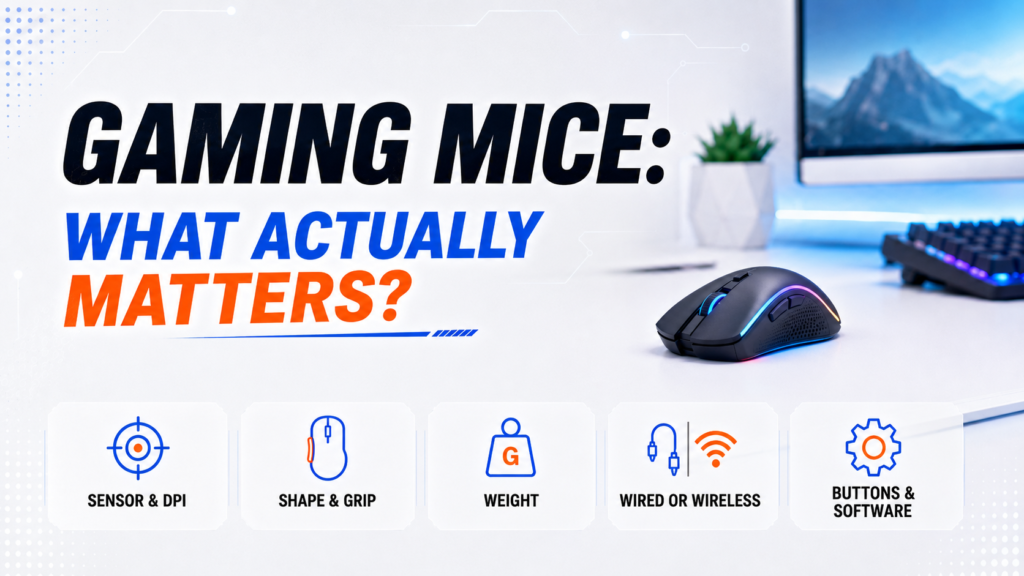
A good gaming mouse is not just a mouse with high DPI, a low weight, and colorful lighting. It needs to fit your hand, match your grip, track consistently, and feel comfortable during long sessions.
This guide evaluates gaming mice based on:
- Comfort and shape
- Grip style compatibility
- Hand size fit
- Mouse weight and balance
- Sensor consistency
- DPI usefulness
- Polling rate practicality
- Wired and wireless reliability
- Button placement
- Build quality
- Mouse feet and glide
- Software usefulness
- Fit for different game genres
We give more weight to practical use than marketing numbers. A mouse can advertise extremely high DPI and still feel wrong if the shape hurts your hand, the side buttons are hard to reach, or the weight does not match your play style.
The right gaming mouse should feel like an extension of your hand, not a gadget you have to fight.
Start With How The Mouse Feels In Your Hand
Before looking at specifications, focus on comfort.
A gaming mouse can have an excellent sensor and advanced features, but if it feels uncomfortable after an hour, you are unlikely to enjoy using it. Comfort affects every session, especially when you play for long stretches.
Shape plays a major role here. Some mice have larger curves that support the entire hand. Others are smaller, flatter, or narrower to encourage quick fingertip movement. Ergonomic mice usually support the hand more, while symmetrical or ambidextrous-style shapes often feel easier to control for players who want faster movement.
Hand size also matters. A mouse that feels natural for someone with large hands may feel difficult to control for someone with smaller hands. A small mouse may help with fast movements, but it can feel cramped if your hand hangs over the sides.
When evaluating a gaming mouse, ask yourself a simple question:
Does this shape feel natural for the way I hold a mouse?
That answer often matters more than any technical specification.
Your Grip Style Matters More Than You Think
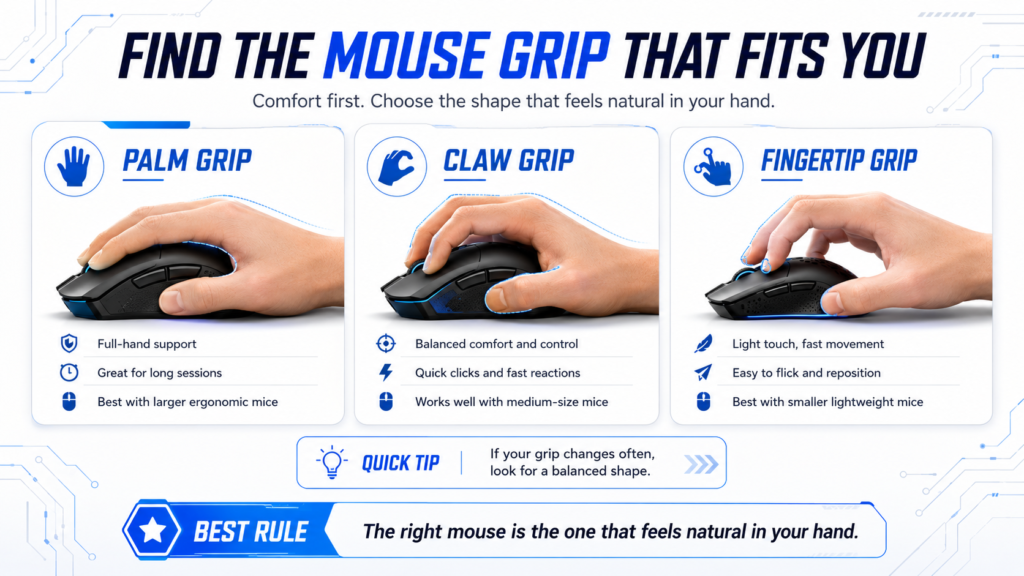
Most gamers naturally use one of three grip styles: palm grip, claw grip, or fingertip grip.
You do not need to force yourself into one category perfectly. Many players use a hybrid grip. Still, knowing your general grip style makes it easier to narrow down the right shape.
| Grip Style | Description | Often Works Best With |
|---|---|---|
| Palm grip | Most of the hand rests on the mouse | Medium to large ergonomic mice |
| Claw grip | Palm touches lightly while fingers arch upward | Medium-sized mice with good control |
| Fingertip grip | Only fingertips touch the mouse | Smaller and lighter mice |
| Hybrid grip | Mix of palm, claw, or fingertip habits | Balanced shapes with safe curves |
Palm Grip
Palm grip provides the most hand support.
This grip often feels comfortable during long gaming sessions because more of your hand rests on the mouse. It usually works best with medium or large mice that fill the hand and support the palm.
Palm grip can feel stable and relaxed, but it may not feel as quick for players who make tiny fingertip adjustments.
Best for:
- Long sessions
- Larger hands
- Relaxed control
- Ergonomic mouse shapes
Claw Grip
Claw grip balances comfort and control.
With claw grip, the palm rests lightly on the back of the mouse while the fingers arch upward. This position can make clicks feel quick and controlled while still giving the hand some support.
Many competitive players like claw grip because it allows fast adjustments without losing stability.
Best for:
- FPS games
- Fast reactions
- Medium-sized mice
- Players who want control and speed
Fingertip Grip
Fingertip grip prioritizes precision and quick movement.
Because less of the hand touches the mouse, players can make rapid directional changes with minimal effort. This grip often works best with smaller, lighter mice that are easy to move with the fingers.
The trade-off is support. Fingertip grip may feel less comfortable during long sessions if your hand gets tired.
Best for:
- Small and light mice
- Quick aim adjustments
- Players who move mostly with the fingers
- Minimal hand contact
How Hand Size Changes The Way A Gaming Mouse Fits
A gaming mouse should match your hand size as well as your grip style.
A mouse that is too large can feel slow, awkward, or hard to lift. A mouse that is too small can force your hand into a cramped position. Both problems can affect control.
You do not need exact measurements to make a better choice, but it helps to think in simple terms.
| Hand Size | Mouse Fit To Consider | What To Watch For |
|---|---|---|
| Smaller hands | Small to medium mice | Avoid tall or wide shells that feel hard to control |
| Medium hands | Medium mice or safe shapes | Focus on grip style and comfort |
| Larger hands | Medium to large mice | Avoid mice that feel cramped or too short |
| Mixed use | Medium balanced shape | Choose comfort over extreme size or weight |
A safe starting point for most players is a medium-sized mouse with a shape that does not force your fingers too far forward or too far back.
Why Gaming Mouse Shape Matters More Than Flashy Specs
Mouse shape affects comfort, aim, control, and confidence.
Two gaming mice can have similar sensors and similar weight but feel completely different in hand. One may support your palm better. Another may give your fingers more freedom. One may feel stable for tracking targets, while another may feel faster for flick shots.
Pay attention to these shape details:
- Hump position
- Width
- Height
- Side curves
- Front button height
- Thumb support
- Grip coating
- How easy it is to lift the mouse
The hump is especially important. A rear hump can support the palm and help claw grip users. A center hump may feel more balanced. A flatter mouse may work better for fingertip control.
A good shape should help you aim without thinking about the mouse itself. When the shape feels wrong, you notice it constantly. That is usually a sign to keep looking.
Weight Can Change The Entire Experience
Weight changes how quickly the mouse starts, stops, and glides across the mousepad.
In recent years, lightweight gaming mice have become popular because they require less effort to move. Many competitive players like the feeling of speed and control that lighter designs provide.
Lighter mice can help with fast flicks, quick corrections, and long sessions because the hand does less work. That can matter in FPS games where repeated movement adds up.
Still, lighter is not automatically better.
Some players prefer heavier mice because they feel more stable and deliberate during movement. A heavier mouse can make tracking feel smoother for some players, especially if they do not like a mouse that feels too floaty.
| Mouse Weight | General Feel | Best For |
|---|---|---|
| Lightweight | Faster and easier to move | FPS players, quick movement, low fatigue |
| Midweight | Balanced between speed and stability | Most players and mixed gaming |
| Heavier | More deliberate movement and control | Players who prefer stability |
The best weight is the one that feels controlled, not just the one with the lowest number.
Why Mouse Balance Matters Alongside Weight
Weight is only part of the story. Balance also changes how a mouse feels.
A mouse can be light but poorly balanced. If too much weight sits in the back, front, or one side, the mouse may feel strange when you lift it or make quick corrections.
A well-balanced mouse feels predictable when you move, stop, and reset it.
This matters most for players who lift their mouse often. If you play at low sensitivity, you may pick up and reposition your mouse many times during a session.
A balanced shape makes that movement feel smoother.
Why Higher DPI Does Not Always Mean Better Aim
DPI gets a lot of attention because it looks impressive on a spec sheet.
DPI describes mouse sensitivity. Higher DPI makes the cursor move farther with less physical movement. Logitech explains DPI as the sensitivity setting for a mouse, where higher DPI creates faster movement.
Many gaming mice advertise extremely high DPI numbers, but most gamers do not need the highest settings. A higher DPI does not automatically make a mouse more accurate. It only changes how much movement the mouse reports.
In fact, many players lower their sensitivity to improve control. Lower sensitivity can make aiming feel steadier because larger hand movements create smaller on-screen movements.
Instead of chasing the highest DPI number, focus on consistency. Choose a DPI and in-game sensitivity combination that feels comfortable, repeatable, and easy to control.
A simple rule helps:
Use a sensitivity that lets you aim smoothly without feeling like you are fighting the mouse.
Sensor Quality Still Matters
Comfort comes first, but the sensor still matters.
A good gaming mouse should track movement consistently. It should not skip, spin out, drift, or feel unpredictable. Most modern gaming mice from reliable brands use strong sensors, so you usually do not need to obsess over the exact sensor name.
What you want is simple: smooth tracking that feels the same every time you move.
Sensor quality matters most when you play games that require precise aim. If your mouse tracking feels inconsistent, your aim can feel inconsistent too.
Look for a mouse that offers:
- Reliable tracking
- No obvious skipping
- No strange acceleration
- Stable performance at your preferred DPI
- Good performance on your mousepad surface
The best sensor is not always the one with the biggest number. It is the one that feels accurate and predictable in real use.
What Polling Rate Means For Gaming Mouse Performance
Polling rate tells you how often the mouse reports its position to the computer.
A 1,000Hz polling rate means the mouse reports up to 1,000 times per second. Some newer gaming mice support higher polling rates, such as 4,000Hz or 8,000Hz. Razer describes 8,000Hz polling as reporting up to eight times more often than 1,000Hz peripherals.
Higher polling rates can make movement feel more responsive, especially for competitive players using high-refresh-rate monitors. But polling rate is not magic.
For most players, a reliable 1,000Hz gaming mouse is already strong. Higher polling rates may help in competitive settings, but they can also use more battery on wireless mice and may not feel dramatically different to every player.
| Polling Rate | What It Means | Best For |
|---|---|---|
| 500Hz | Reports often enough for casual use | Basic gaming and everyday use |
| 1,000Hz | Common gaming standard | Most players |
| 4,000Hz | More frequent reporting | Competitive players with high-refresh setups |
| 8,000Hz | Very high reporting rate | Enthusiasts and competitive players |
Focus on comfort, shape, sensor consistency, and control before worrying about ultra-high polling rates.
Wired Vs Wireless Gaming Mice
The gap between wired and wireless gaming mice has become much smaller.
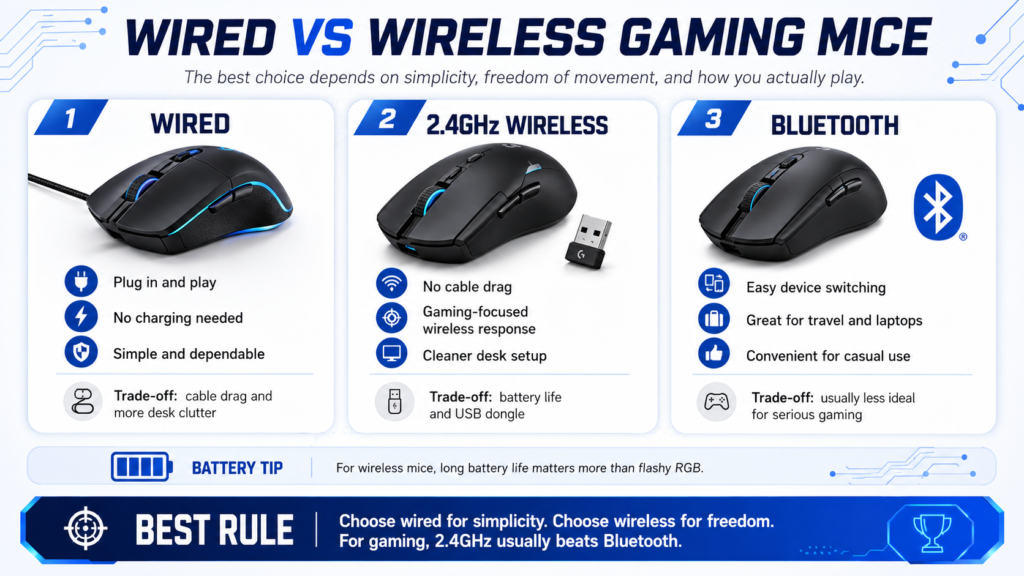
Modern wireless gaming mice can offer excellent responsiveness while giving players more freedom of movement. Many gaming-focused wireless mice use a 2.4GHz USB dongle instead of basic Bluetooth because that connection is built for more responsive gaming. Logitech’s G305 Lightspeed, for example, advertises a 1 ms response time over its Lightspeed wireless connection.
The choice often comes down to preference.
| Feature | Wired Mouse | Wireless Mouse |
|---|---|---|
| Setup | Simple connection | Requires charging or batteries |
| Movement | Cable may create drag | No cable drag |
| Maintenance | Minimal | Battery management |
| Desk appearance | More cables | Cleaner setup |
| Travel | Less battery concern | Easier cable-free packing |
Wired mice remain popular because they are simple and reliable. They do not need charging, and they are usually more affordable than similar wireless models.
Wireless mice appeal to players who want a cleaner setup and unrestricted movement. No cable means no cable drag, which can make the mouse feel smoother during wide movements.
2.4GHz Wireless Vs Bluetooth
Not all wireless gaming mice connect the same way.
Bluetooth is useful for laptops, tablets, travel, and switching between devices. It is convenient, but it is not always the best choice for gaming performance.
A 2.4GHz wireless dongle is usually the better gaming option. It is designed for a stronger, more responsive connection. Many gaming mice include a USB receiver for this reason.
| Wireless Type | Best For | Trade-Off |
|---|---|---|
| Bluetooth | Convenience and device switching | May feel less responsive for gaming |
| 2.4GHz wireless | Gaming performance | Requires a USB receiver |
| Wired mode | Charging while playing or maximum simplicity | Adds cable drag |
If you choose a wireless gaming mouse, check whether it includes a 2.4GHz dongle. That detail matters more than simply seeing the word “wireless.”
Battery Life Matters More Than You Expect
Battery life can affect how much you enjoy a wireless mouse.
A mouse with great performance can still become annoying if you charge it constantly. Some wireless mice use rechargeable batteries. Others use replaceable batteries. Both can work well, but they feel different in daily use.
Rechargeable mice are convenient if you keep a charging cable nearby. Battery-powered mice can last a long time, but you need spare batteries.
Pay attention to:
- Battery life with RGB on
- Battery life with RGB off
- Charging cable quality
- Whether the mouse can work while charging
- Battery warning indicators
- Software battery readouts
For many players, long battery life matters more than flashy lighting.
Which Mouse Buttons And Customization Features Actually Matter?
Not every gaming mouse needs a large number of buttons.
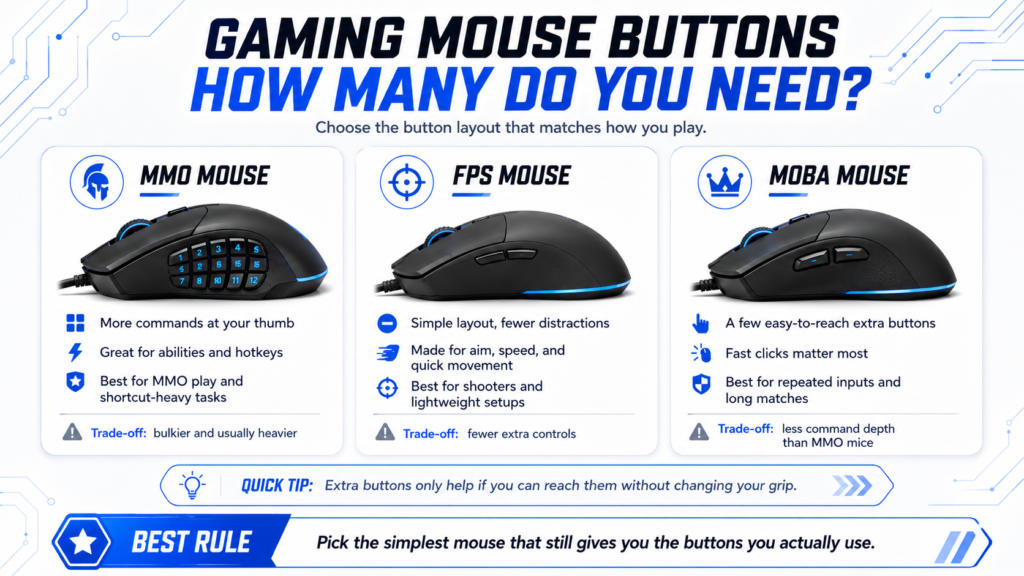
For many players, two side buttons are more than enough. They can handle common actions like melee, push-to-talk, reload, crouch, abilities, or browser navigation.
Additional buttons become more useful in games that involve many commands, abilities, or shortcuts.
The key is reach. Extra buttons only help if you can press them comfortably without changing your grip.
MMO Mice
MMO mice often include a large button grid on the side.
These designs can make it easier to access abilities and commands without moving your hand to the keyboard. They can also help with productivity, editing, and games that use many hotkeys.
The trade-off is size and complexity. MMO mice are often heavier and bulkier than simple FPS mice.
Best for:
- MMO games
- Ability-heavy games
- Players who like shortcuts
- Productivity users who want more commands
FPS Mice
FPS mice usually prioritize simplicity.
Many competitive players prefer lighter mice with fewer buttons because they focus on movement and aiming rather than complex commands. Extra buttons can add weight, clutter, or accidental presses.
Best for:
- First-person shooters
- Fast aim adjustments
- Lightweight designs
- Simple button layouts
MOBA Mice
MOBA players often need fast, reliable clicks and comfortable access to a few key commands.
A MOBA mouse does not usually need a full side-button grid, but well-placed side buttons can help. Shape and click feel matter because players often make repeated inputs during long matches.
Best for:
- Comfortable grip
- Responsive main clicks
- A few easy-to-reach side buttons
- Reliable software profiles
Which Gaming Mouse Software Features Are Actually Useful?
Many gaming mice include software that allows customization.
Common options include:
- Button remapping
- DPI adjustments
- Polling rate settings
- Lighting controls
- Profile switching
- Macro creation
- Surface calibration
- Battery monitoring
These features can be useful, but they should support your experience rather than determine your purchase.
A mouse with simple, reliable software is often better than one with complicated software you do not enjoy using. The most useful settings are usually DPI, button mapping, and profiles.
RGB lighting is optional. It can look great, but it should not matter more than comfort, shape, tracking, and button quality.
How Mouse Feet Affect Glide, Control, And Aim
Mouse feet, also called skates, affect how the mouse moves across the pad.
Good mouse feet help the mouse glide smoothly. Poor feet can feel scratchy, uneven, or slow. This can affect aim because your movement may not feel consistent.
Mouse feet matter most when you play aim-heavy games. If the mouse catches on the pad or feels rough, small corrections become harder.
Also think about your mousepad. A fast mousepad can make a mouse feel lighter and quicker. A control-focused pad can make movement feel steadier. The same mouse may feel different on different surfaces.
Look for:
- Smooth glide
- No scratchy feeling
- Stable contact with the pad
- Feet that fit the mouse evenly
- A mousepad surface that matches your preference
The mouse and mousepad work as a pair. Treat them like teammates, not strangers in the lobby.
Lift-Off Distance Can Affect Control
Lift-off distance is how high you can lift the mouse before the sensor stops tracking.
This matters if you often lift and reset your mouse. Low-sensitivity players do this a lot because they need more desk space for wider movements.
A lower lift-off distance can help prevent unwanted cursor movement when you pick up the mouse. A higher lift-off distance may cause the cursor to move slightly while the mouse is in the air.
Most players do not need to obsess over this setting. But if you play FPS games and reset your mouse often, it can affect comfort and consistency.
How Build Quality And Click Feel Change The Experience
A gaming mouse should feel solid, not fragile.
Build quality affects how the mouse feels over time. A mouse that creaks, flexes, rattles, or has loose buttons can become distracting during gameplay.
Click feel also matters. Main buttons should feel responsive and consistent. Side buttons should be easy to reach without feeling mushy or too stiff. The scroll wheel should feel stable, especially if you use it for weapon switching, abilities, browsing, or productivity.
Pay attention to:
- Shell stability
- Main click feel
- Side button placement
- Scroll wheel quality
- Coating and grip texture
- Cable flexibility on wired mice
- Receiver storage on wireless mice
Small details can make a mouse feel premium or annoying.
How To Match A Gaming Mouse To The Games You Play
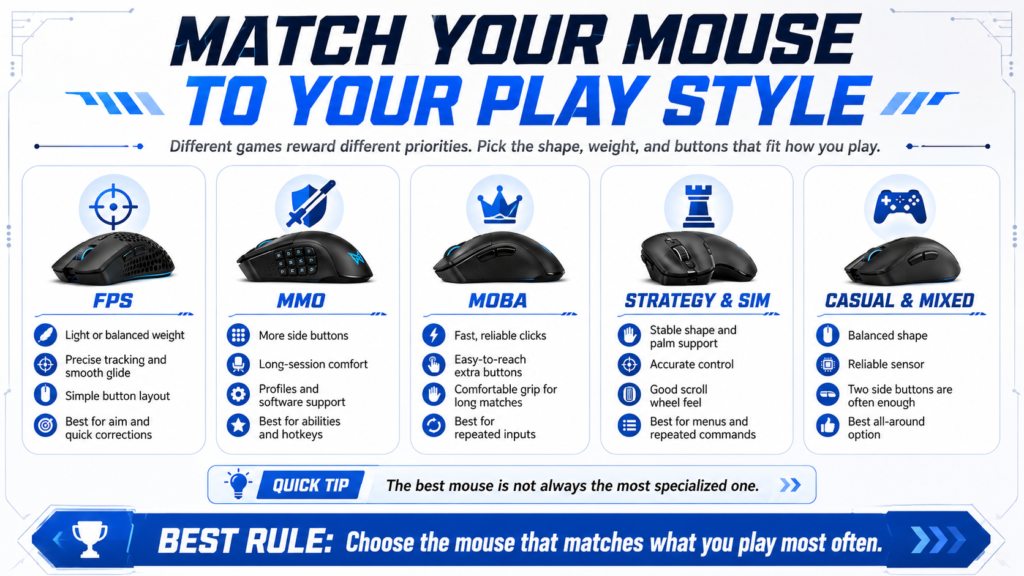
Different games reward different priorities.
A good gaming mouse for one player may feel wrong for another. The right choice depends on what you play most often.
FPS Games
First-person shooters often benefit from:
- Lightweight or midweight designs
- Comfortable grip
- Reliable sensor tracking
- Consistent glide
- Simple button layout
- Low cable drag or strong wireless performance
- Comfortable shape for repeated aim adjustments
Precision and control usually matter more than extra buttons.
A lightweight mouse can help with fast flicks and quick corrections. A stable midweight mouse can also work well if you prefer more deliberate movement.
MMO Games
MMO players often benefit from:
- Additional programmable buttons
- Comfortable long-session use
- Custom profiles
- Strong software support
- Stable shape
- Easy-to-reach side buttons
An MMO mouse can reduce how often you need to stretch across the keyboard for abilities. That can make gameplay feel smoother, especially if you use many commands.
MOBA Games
MOBA players often look for:
- Fast access to commands
- Comfortable grip
- Reliable button placement
- Responsive main clicks
- Good scroll wheel control
A MOBA mouse does not need to be extreme. Comfort, clicks, and button placement often matter most.
Strategy And Simulation Games
Strategy and simulation games may benefit from:
- Extra buttons
- Comfortable palm support
- Accurate cursor control
- Good scroll wheel feel
- Larger or more stable shapes
These games often involve menus, camera movement, and repeated commands. Comfort and control can matter more than ultra-light weight.
Casual And Mixed Gaming
Many players enjoy multiple genres.
In these situations, versatility is often more important than specialization. A comfortable, well-balanced mouse with a reliable sensor and two side buttons can handle a wide range of gaming experiences.
For mixed gaming, avoid going too extreme. An ultra-light FPS mouse may not give enough buttons for some games. A large MMO mouse may feel too bulky for shooters.
What To Prioritize Based On Your Needs
| Your Priority | Focus On This |
|---|---|
| Better aim control | Comfortable shape, reliable sensor, consistent glide |
| More speed | Lightweight mouse, low cable drag, good mouse feet |
| Long sessions | Ergonomic shape, comfortable coating, good hand fit |
| MMO games | Extra programmable buttons and strong software |
| FPS games | Lightweight or midweight shape with simple buttons |
| Casual gaming | Comfort, reliability, and easy setup |
| Wireless setup | 2.4GHz wireless, strong battery life, reliable receiver |
| Small hands | Smaller shell and easy-to-reach buttons |
| Large hands | Medium to large shape with enough palm support |
| Budget setup | Comfortable wired mouse with a reliable sensor |
| Clean desk | Wireless mouse with long battery life |
The Best Gaming Mouse For Most Players
For most players, the best gaming mouse is a comfortable midweight or lightweight mouse with a reliable sensor, two side buttons, and a shape that fits your grip style.
That type of mouse works well across many games. It is simple enough for FPS games, useful enough for casual and mixed gaming, and comfortable enough for everyday computer use.
- Choose a lightweight mouse if you play fast shooters and want easier movement.
- Choose a heavier or more stable mouse if you prefer deliberate control.
- Choose an MMO mouse if you use many commands and want more side buttons.
- Choose a wireless mouse if you want a cleaner setup and less cable drag.
- Choose a wired mouse if you want simple reliability and do not want to think about charging.
The best gaming mouse is not the one with the highest DPI or the most buttons. It is the one that feels natural, tracks consistently, and supports the games you actually play.
Common Gaming Mouse Mistakes
Choosing A Mouse Based Only On DPI
DPI is important, but it is not the most important factor.
A very high DPI number does not guarantee better aim. Comfort, control, sensor consistency, and sensitivity settings often have a bigger impact on the experience.
Ignoring Hand Size
A mouse should fit your hand.
Even highly rated mice can feel awkward if the size is wrong for you. If the mouse is too large, it may feel hard to control. If it is too small, your hand may feel cramped.
Focusing Too Much On Weight Trends
Lightweight mice are popular, but they are not automatically the best choice for every player.
Some players aim better with a little more weight because the mouse feels more stable. Choose the weight that gives you the most control.
Buying More Buttons Than You Need
Additional buttons can be useful, but they can also add complexity.
If your games do not benefit from extra commands, a simpler mouse may feel cleaner and easier to use.
Ignoring Comfort
Comfort affects every gaming session.
A mouse that feels great after five minutes may feel very different after three hours. Long-session comfort should matter more than a flashy feature list.
Treating Wireless As One Category
Wireless mice are not all the same.
Bluetooth is convenient, but a 2.4GHz gaming dongle is usually better for gaming performance. Check the connection type before deciding.
Forgetting About The Mousepad
Your mousepad changes how the mouse feels.
A good mouse on the wrong surface may feel too fast, too slow, or inconsistent. If your mouse does not feel right, the pad may be part of the problem.
Conclusion
A gaming mouse does not need the highest DPI, the lowest weight, or the longest feature list to be a good choice.
What matters most is how the mouse feels in your hand, how comfortably it fits your grip style, and how well it supports the games you play.
Start with comfort and shape. Then think about hand size, grip style, weight, sensor quality, wireless connection, button layout, mouse feet, and software. Specs matter, but they should support the experience instead of distracting from it.
For most players, a comfortable mouse with a reliable sensor, a practical weight, two side buttons, and a shape that fits naturally will be the best starting point.
By focusing on comfort, control, and practical features instead of marketing numbers alone, you can choose a gaming mouse that feels natural every time you sit down to play.
Frequently Asked Questions
What Matters Most In A Gaming Mouse?
For most players, comfort, shape, grip style compatibility, hand size fit, and sensor quality have the biggest impact on daily use.
DPI, polling rate, and software features matter too, but they should not matter more than how the mouse feels in your hand.
Is A Lightweight Gaming Mouse Better?
Not always. Lightweight mice are popular because they are easier to move and stop, especially in FPS games.
Some players still prefer heavier mice because they feel more stable and controlled. The best weight depends on your play style and comfort.
How Much DPI Do I Need For Gaming?
Most gamers do not need extremely high DPI settings.
A comfortable, consistent sensitivity is usually more important than maximum DPI. Many players use moderate DPI settings and adjust their in-game sensitivity for better control.
Does Polling Rate Matter For Gaming?
Yes, but only to a point.
A 1,000Hz polling rate is strong enough for most players. Higher polling rates like 4,000Hz or 8,000Hz may appeal to competitive players, especially with high-refresh-rate monitors, but comfort and control still matter more for everyday gaming.
Are Wireless Gaming Mice Good For Gaming?
Yes. Modern wireless gaming mice can be excellent for gaming.
For the best wireless gaming experience, look for a mouse with a 2.4GHz wireless dongle rather than relying only on Bluetooth.
Is Wired Better Than Wireless For Gaming?
Wired mice are simple, reliable, and do not need charging.
Wireless mice offer more freedom and remove cable drag. Both can be good choices. The better option depends on your setup and preferences.
How Do I Know Which Mouse Shape Is Right For Me?
Your grip style, hand size, and comfort preferences are the best indicators.
A good shape should feel natural during long sessions. You should be able to reach the buttons easily, lift the mouse comfortably, and move it without changing your grip too much.
How Many Buttons Should A Gaming Mouse Have?
Most players only need the standard buttons plus two side buttons.
MMO players, strategy players, and productivity users may benefit from more programmable buttons. FPS players often prefer fewer buttons because they keep the mouse lighter and simpler.
Do Mouse Feet Matter?
Yes. Mouse feet affect glide, smoothness, and control.
Good mouse feet help the mouse move consistently across the mousepad. Poor feet can feel scratchy or uneven, which can affect aim and comfort.
What Is The Best Gaming Mouse For Most Players?
For most players, the best gaming mouse is a comfortable lightweight or midweight mouse with a reliable sensor, two side buttons, and a shape that fits their grip style.
That kind of mouse works well for many games without becoming too specialized.

0 Comments