Introduction
A gaming keyboard can seem like a small upgrade until you notice how often you use it. Every movement, shortcut, command, message, and reaction starts with a key press.
The wrong keyboard can make a setup feel cramped, loud, uncomfortable, or harder to use than it needs to be.
Gaming keyboards are not all built for the same kind of player. A compact keyboard may work well for someone who needs more mouse space, while a full-size keyboard may suit someone who wants every key available. A fast mechanical switch may feel right for one gamer, while a quieter keyboard may make more sense for another.
This guide breaks down the main types of gaming keyboards, how they feel, what each layout does well, and which features matter most so you can choose the keyboard that fits your setup and the way you play.
Key Takeaways
- The best gaming keyboard depends on your games, desk space, comfort needs, noise tolerance, and typing preferences.
- Keyboard size affects mouse room, layout comfort, and daily usability.
- Mechanical keyboards are popular for gaming, but membrane keyboards can still work well for casual players and quieter setups.
- Magnetic switches are worth considering if you want adjustable actuation, rapid key resets, and more control over how each press responds.
- Switch feel matters because it changes how every key press responds under your fingers.
- A TKL keyboard is often the safest middle ground for most gamers because it saves space without removing too many useful keys.
- Extra features like RGB lighting, wireless connectivity, macros, and hot-swappable switches only matter when they fit how you play.
Affiliate Disclaimer: Some links on this site are affiliate links. If you buy through them, we may earn a small commission, at no extra cost to you. Please do your own research before making a purchase.
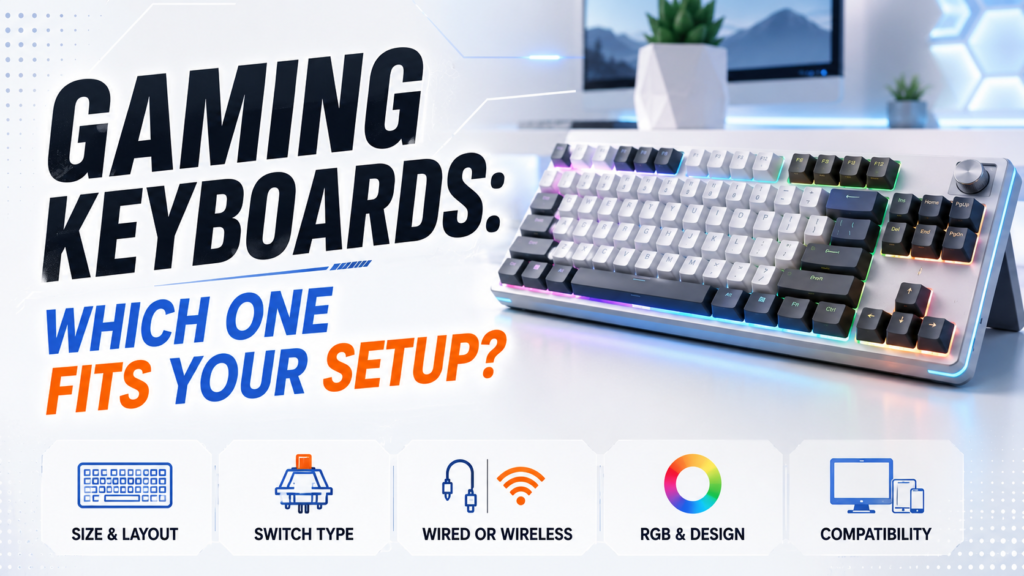
How This Guide Evaluates Gaming Keyboards
A good gaming keyboard needs to fit the player, the desk, the games, and the daily routine.
This guide compares gaming keyboard types based on:
- Desk space and mouse room
- Layout comfort
- Access to important keys
- Switch feel and noise
- Wired or wireless connection
- Build quality and stability
- Long-session comfort
- Usefulness for different game genres
- Everyday typing and productivity needs
A keyboard can have great specs and still feel wrong in real use. A 60% keyboard may look clean, but it can frustrate someone who uses arrow keys every day. A full-size keyboard may feel familiar, but it can crowd the mouse area during FPS games.
The right choice comes from matching the keyboard to your actual setup, not just picking the one with the longest feature list.
Start With The Way You Use Your Keyboard
Before comparing keyboard types, think about how the keyboard fits into your normal routine.
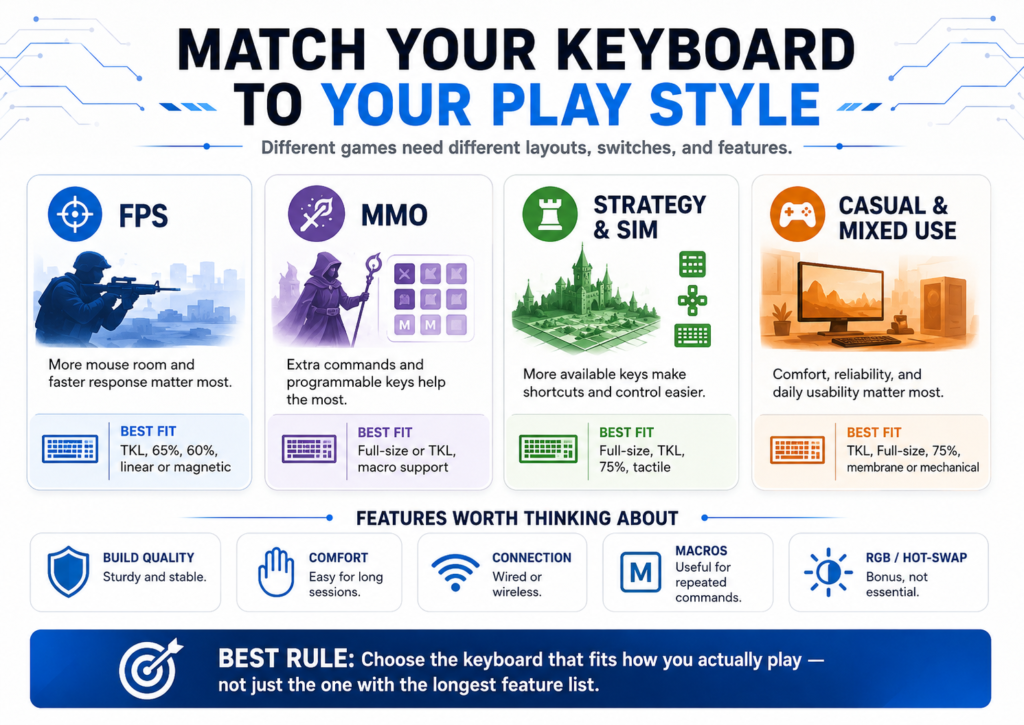
A player who mostly plays competitive shooters may want a smaller keyboard that leaves more space for wide mouse movement. A player who enjoys MMOs or strategy games may prefer more keys for shortcuts. Someone who uses the same keyboard for gaming, work, school, and browsing may need a more balanced layout.
The right keyboard is not just about gaming performance. It should feel natural every time you sit down at your setup.
| If You Mostly Play | You May Want | Why It Helps |
|---|---|---|
| FPS games | TKL, 65%, or 60% keyboard | Gives your mouse more room |
| MMO games | Full-size keyboard or programmable keys | Makes more commands easier to reach |
| Strategy games | Full-size or TKL keyboard | Keeps shortcuts and control keys available |
| Casual games | Comfortable basic gaming keyboard | Keeps the setup simple |
| Mixed gaming and work | Full-size, TKL, or 75% keyboard | Balances gaming space with daily usability |
A simple rule helps here: choose the smallest keyboard that still gives you the keys you actually use.
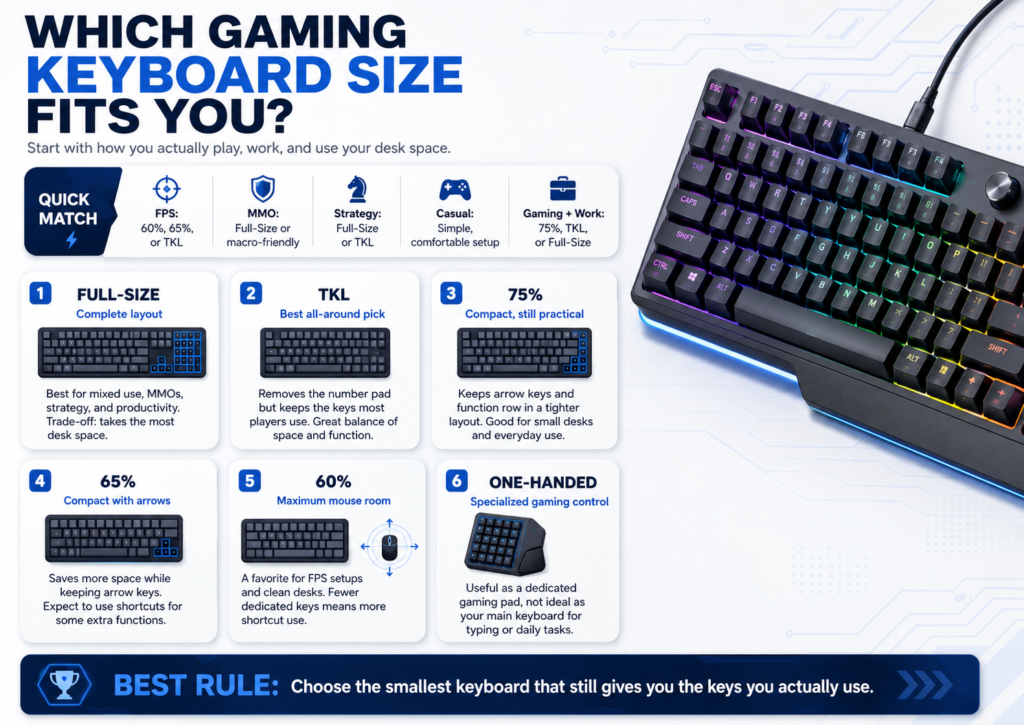
The First Big Choice Is Keyboard Size
Keyboard size affects more than how much space the keyboard takes up.
It changes how your desk feels, how much room your mouse has, and how often you need shortcuts to access missing keys. This choice matters because it shapes your setup every day.
A smaller keyboard can give you more freedom for mouse movement. A larger keyboard can make daily tasks easier because more keys stay available. Neither option is automatically better. The right size depends on what you play and what else you do at your computer.
Full-Size Keyboards
A full-size keyboard includes the number pad, function row, arrow keys, and navigation keys.
This layout works well if you want every key available without shortcuts. It makes sense for gamers who also use their keyboard for work, school, spreadsheets, simulation games, or general computer tasks.
The trade-off is space. A full-size keyboard can crowd your mouse area, especially if you play games that require large mouse movements. On a smaller desk, the extra width can push your mouse too far to the side, which may make long sessions less comfortable.
Best for:
- Mixed gaming and productivity
- Strategy games
- Simulation games
- MMO players who want more key access
- Users who want a familiar layout
Tenkeyless Keyboards
A tenkeyless keyboard, often called TKL, removes the number pad but keeps most other keys.
This is one of the most practical gaming layouts because it saves space without feeling too limited. You still get the function row, arrow keys, and navigation keys, but your mouse has more room.
For many gamers, TKL is the safest middle ground. It feels familiar, keeps useful keys within reach, and creates more space than a full-size keyboard.
Best for:
- FPS players
- General PC gaming
- Smaller desks
- Gamers who do not need a number pad
- Users who want a balance between gaming and daily use
75% Keyboards
A 75% keyboard keeps many of the keys people use often, but it places them in a tighter layout.
You usually still get the function row and arrow keys, which makes a 75% keyboard easier to use than smaller compact layouts. The closer spacing can feel crowded at first, especially if you are used to a full-size keyboard.
A 75% keyboard works well for people who want a compact setup but do not want to give up too many dedicated keys.
Best for:
- Small desks
- Mixed gaming and productivity
- Users who want a compact layout with arrow keys
- Players who want less width without going too minimal
65% Keyboards
A 65% keyboard removes the function row and number pad, but it usually keeps arrow keys.
This layout gives you more mouse room while keeping one of the most useful navigation features. That makes it a good option for players who want a compact keyboard but still use arrow keys often.
You may need shortcuts for function keys and other commands. That can feel natural after practice, but it may slow you down if you use those keys often.
Best for:
- Minimal gaming setups
- FPS gaming
- Users who still want arrow keys
- Players who are comfortable learning shortcuts
60% Keyboards
A 60% keyboard removes even more dedicated keys. It usually does not include a number pad, function row, arrow keys, or navigation cluster.
The main advantage is space. A 60% keyboard gives you maximum room for mouse movement and creates a very clean desk setup. This can help FPS players who use low mouse sensitivity and need more room for wide movements.
Daily usability takes more adjustment. You need shortcuts for many common functions. A 60% keyboard can feel great for focused gaming, but it can become frustrating if you often use arrow keys, function keys, or productivity shortcuts.
Best for:
- FPS-focused players
- Minimal desk setups
- Users who value mouse space above all else
- Players comfortable with keyboard shortcuts
One-Handed Gaming Keyboards
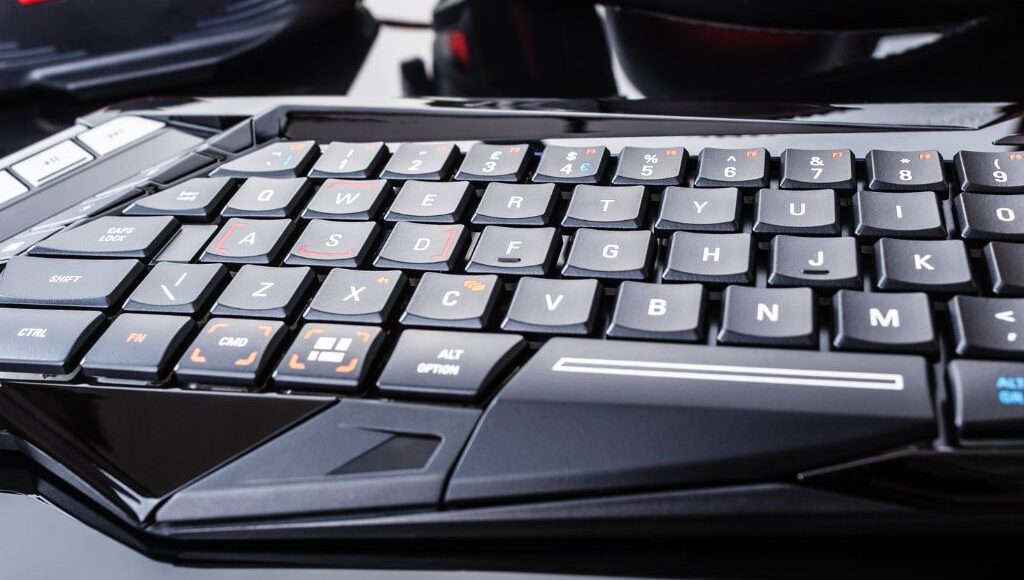
A one-handed gaming keyboard focuses on the keys used most during gameplay.
These are more specialized. They are not usually the best choice for everyday typing, work, school, or general computer use. They can make sense for players who want a dedicated gaming keypad while keeping a separate keyboard for normal tasks.
One-handed keyboards can also help players with limited desk space, but they work best as part of a specific gaming setup rather than as a main keyboard.
Best for:
- Specialized gaming setups
- Players with limited desk space
- Users who want dedicated gaming controls
- Gamers who already have a separate keyboard for typing
Compare Keyboard Sizes Before Choosing
| Keyboard Type | Main Advantage | Main Trade-Off | Best Fit |
|---|---|---|---|
| Full-size | Complete layout | Takes more desk space | Mixed use and productivity |
| TKL | Balanced size and function | No number pad | Most gamers |
| 75% | Compact but still functional | Tighter layout | Small desks and mixed use |
| 65% | Saves more space while keeping arrow keys | Fewer dedicated keys | Minimal setups |
| 60% | Maximum mouse room | Requires many shortcuts | FPS-focused players |
| One-handed | Dedicated gaming controls | Poor for normal typing | Specialized setups |
For most players, a TKL keyboard is the easiest layout to recommend. It removes the number pad, creates more mouse room, and keeps the keys many people still use every day.
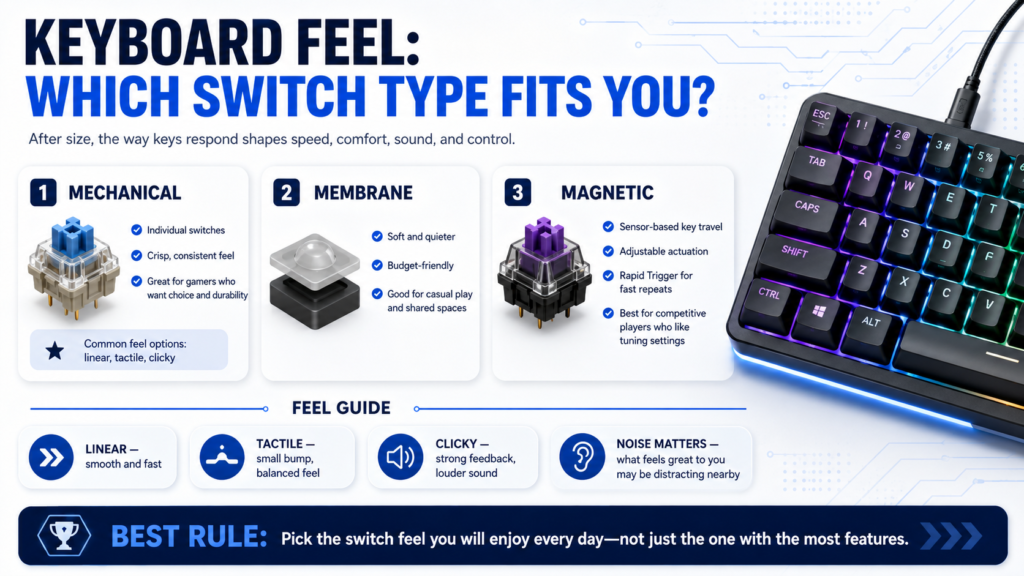
The Second Big Choice Is How The Keys Feel
After size, key feel is the next major decision.
Every action passes through the keys. Movement, jumping, crouching, reloading, typing, chatting, and shortcuts all depend on how the keyboard responds under your fingers.
Key feel affects speed, comfort, noise, and confidence. Some players like smooth keys that press down quickly. Others prefer a small bump that confirms the key press. Some enjoy clicky feedback, while others need a quieter setup.
Mechanical Keyboards
Mechanical keyboards use individual switches under each key.
Many gamers like them because they often feel precise, consistent, and durable. They also come in different switch styles, so one mechanical keyboard can feel very different from another.
A linear switch can feel smooth and fast. A tactile switch can feel more controlled. A clicky switch can feel satisfying but loud.
Mechanical keyboards are often a strong choice for players who care about feel, response, customization, and long-term durability.
Membrane Keyboards
Membrane keyboards use a softer pressure layer under the keys.
They are often quieter and more affordable. They may not feel as crisp as mechanical keyboards, but they can still work well for casual gaming and everyday use.
A membrane keyboard is not automatically bad. It may be the right choice if you want something simple, quiet, and budget-friendly.
Membrane keyboards also make sense for shared spaces where loud key presses would bother other people.
Magnetic Switches
Magnetic switches, often called Hall effect switches, use magnets and sensors to detect key movement.
Traditional mechanical switches register a key press at a fixed point. Magnetic switches can track how far the key moves, which allows some keyboards to offer adjustable actuation. That means you can set a key to trigger with a lighter press or a deeper press, depending on how you want the keyboard to feel.
Many magnetic gaming keyboards also include Rapid Trigger. This feature lets a key reset as soon as you start lifting it instead of waiting for it to return to a fixed reset point. For fast movement in games, that can make repeated inputs feel quicker and more responsive.
Magnetic switches are especially useful for competitive players who want more control over movement keys. They can help in games where quick strafing, stopping, counter-strafing, or repeated key presses matter.
They are not automatically the best choice for everyone. Magnetic switch keyboards often cost more, and the extra settings may feel unnecessary if you play casually or do not want to tune your keyboard. Some players may also prefer the feel, sound, and simplicity of standard mechanical switches.
Best for:
- Competitive FPS players
- Players who want adjustable actuation
- Gamers who like tuning keyboard settings
- Users who want fast key resets for repeated inputs
Common Switch Types Explained
| Switch Type | How It Feels | Best For | Possible Downside |
|---|---|---|---|
| Linear | Smooth key press with no bump | Fast-paced gaming | Less physical feedback |
| Tactile | Small bump when pressed | Gaming and typing balance | May feel slower to some users |
| Clicky | Bump plus audible click | Users who like strong feedback | Can be loud |
| Magnetic | Adjustable key response on supported keyboards | Competitive gaming and fast repeated inputs | Usually costs more and may require setup |
| Membrane | Soft press | Budget and quiet setups | Less crisp key feel |
Linear switches often appeal to competitive players because they feel smooth and quick. Tactile switches can work well for people who game and type on the same keyboard. Clicky switches can feel fun, but they are not ideal for every room.
Magnetic switches add another option for players who want deeper control. They make the most sense when you will actually use features like adjustable actuation or Rapid Trigger.
Noise matters more than many people expect. A keyboard that sounds great to you may sound distracting to someone sitting nearby.
Match The Keyboard To The Games You Play
Different games place different demands on a keyboard.
A good keyboard for one type of player may not feel right for another. Your gaming style should guide the decision.
FPS Games
FPS players often care about mouse space, quick movement, and consistent key response.
A TKL, 65%, or 60% keyboard can work well because it leaves more room for wide mouse movement. Linear switches may appeal to players who want smooth, fast key presses. Magnetic switches may also make sense for competitive players who want adjustable actuation and rapid key resets.
The main goal is to avoid crowding your mouse hand. If your keyboard takes up too much space, your mouse movement may feel restricted.
Strong fits:
- TKL keyboard
- 65% keyboard
- 60% keyboard
- Linear mechanical switches
- Magnetic switches for competitive play
MMO Games
MMO players often use many abilities, commands, and shortcuts.
A full-size keyboard, macro keys, or programmable functions may be more useful here. More available keys can make it easier to organize repeated actions.
A compact keyboard can still work, but it may require more layered shortcuts. That can add friction if you already manage many commands during gameplay.
Strong fits:
- Full-size keyboard
- TKL keyboard with programmable keys
- Keyboard with macro support
- Tactile or linear switches based on preference
Strategy And Simulation Games
Strategy and simulation games often use more menus, shortcuts, and camera controls.
A full-size or TKL keyboard usually makes sense because these games can benefit from having more keys available. If you use number keys, function keys, or navigation keys often, a larger layout can make gameplay smoother.
Strong fits:
- Full-size keyboard
- TKL keyboard
- 75% keyboard
- Tactile switches for mixed control and typing
Casual And Mixed Gaming
Casual players usually do not need the most specialized keyboard.
Comfort, reliability, and simple controls matter more. A TKL, full-size, or 75% keyboard can be a strong fit depending on desk space.
If you also use your keyboard for work, school, browsing, or chatting, avoid choosing a layout that makes everyday tasks harder.
Strong fits:
- TKL keyboard
- Full-size keyboard
- 75% keyboard
- Membrane or mechanical switches based on budget and noise
Features That Are Actually Worth Considering
Not every feature needs to matter to every player.
The best way to think about features is simple: does this make the keyboard easier, more comfortable, or more useful for the way you play?
Build Quality
A good keyboard should feel stable.
If it flexes, slides around, or feels hollow, it may become annoying over time. Better build quality can also help the keyboard last longer.
Look for:
- A sturdy frame
- Stable keycaps
- Non-slip feet
- A layout that does not feel cramped
- Keys that do not wobble too much
- A cable or wireless connection that feels reliable
Build quality also affects sound. A cheap keyboard can sound hollow or rattly, even if the switches feel fine.
Comfort
Comfort matters more than many people expect.
A keyboard that feels too tall, too narrow, too loud, or too stiff can become frustrating during long sessions. If you play for hours, comfort is not a bonus. It is part of the experience.
Pay attention to wrist position. If your wrists bend upward too much, the keyboard may feel uncomfortable over time. A wrist rest may help if the keyboard sits high on the desk.
Comfort also depends on layout. A compact keyboard can feel great for mouse room, but it may feel awkward if you constantly need missing keys.
Wired Or Wireless Connection
Wired keyboards are simple and reliable. They do not need charging and are usually easy to connect.
Wireless keyboards reduce cable clutter and can make a desk look cleaner. Battery life and charging become the main trade-offs.
For gaming, 2.4GHz wireless is usually the stronger wireless option compared with basic Bluetooth because it is designed for a more responsive connection. Bluetooth can still work well for casual use, travel, and switching between devices.
| Connection Type | Best Reason To Choose It | Trade-Off |
|---|---|---|
| Wired | Simple and reliable | Adds cable clutter |
| Wireless | Cleaner setup | Needs charging |
| Bluetooth | Easy device switching | May vary by device |
| 2.4GHz wireless | Better gaming-focused wireless option in many cases | Usually needs a USB dongle |
Programmable Keys And Macros
Programmable keys can help if you play games with repeated commands.
They are especially helpful for MMOs, strategy games, editing, streaming, or productivity tasks. For simple casual gaming, they may not matter much.
Macros are most useful when they save you from repeating the same inputs often. They are less important if you mostly play games that use standard movement and action keys.
RGB Lighting
RGB lighting is mostly about style, but it can still be useful.
It can help you see keys in a dark room, organize different profiles, or match the rest of your setup. It should not be the main reason to choose a keyboard, but it is fine to value it if aesthetics matter to you.
Treat RGB as a bonus. Choose the right size, feel, and comfort first.
Hot-Swappable Switches
Hot-swappable keyboards let you change switches without replacing the entire keyboard.
This is useful if you want to experiment with different key feel later. It also gives the keyboard more long-term flexibility.
Hot-swappable switches matter less if you already know what you like or just want something simple. For players who enjoy customizing their setup, this feature can be a major plus.

What To Prioritize Based On Your Needs
| Your Priority | Focus On This |
|---|---|
| More mouse space | TKL, 65%, or 60% layout |
| Everyday typing | Full-size, TKL, or 75% layout |
| Quiet setup | Membrane or quieter mechanical switches |
| Fast key feel | Linear mechanical or magnetic switches |
| Adjustable key response | Magnetic switches |
| More shortcuts | Full-size layout, macros, or programmable keys |
| Clean desk | Wireless or compact keyboard |
| Long sessions | Comfort, wrist position, and build quality |
| Budget setup | Membrane or entry-level mechanical keyboard |
| Easy adjustment | TKL or full-size layout |
| Maximum customization | Mechanical keyboard with hot-swappable switches |
The Best Gaming Keyboard Type For Most Players
For most gamers, a TKL mechanical keyboard is the safest choice.
It saves desk space, gives your mouse more room, and keeps important keys like arrows, function keys, and navigation keys.
That makes it easier to use than smaller layouts while still feeling better for gaming than a large full-size keyboard on a crowded desk.
- Choose a full-size keyboard if you need the number pad for work, school, strategy games, simulation games, or productivity tasks.
- Choose a 75% keyboard if you want a smaller layout but still want many dedicated keys.
- Choose a 65% keyboard if you want more mouse room but still want arrow keys.
- Choose a 60% keyboard if you mainly play FPS games and feel comfortable using shortcuts.
- Choose a magnetic switch keyboard if you play competitive games and want adjustable actuation, Rapid Trigger, or more control over movement inputs.
- Choose a membrane keyboard if you want something quieter, simpler, and more affordable.
- Choose a keyboard with macro keys if you play MMOs, use many repeated commands, or want more control for streaming and productivity.
The best gaming keyboard is not the most expensive one. It is the one that fits your space, your hands, and your habits.
Common Gaming Keyboard Mistakes
Choosing The Wrong Size
A keyboard can be well-made and still be the wrong size for your setup.
A full-size keyboard may feel crowded on a small desk. A 60% keyboard may feel frustrating if you often use arrow keys or function keys.
Size should match both your games and your daily habits.
Ignoring Noise
Some keyboards are louder than expected.
Clicky switches may feel satisfying, but they can bother roommates, family members, coworkers, or anyone nearby. If you share a space, noise matters.
For quieter setups, consider membrane keyboards, quieter linear switches, quieter tactile switches, or keyboards designed with better sound dampening.
Buying More Features Than You Need
Extra features can be useful, but only if you use them.
A keyboard with macros, advanced software, wireless modes, lighting profiles, and hot-swappable switches may be unnecessary for someone who only needs a comfortable gaming keyboard.
Start with the basics: size, feel, comfort, and connection type. Then decide which extras actually help.
Forgetting About Daily Use
Many gamers use the same keyboard for more than gaming.
If you type, study, work, or browse on the same computer, choose a keyboard that feels good outside of games too.
Very compact layouts can become tricky here. They may help during gameplay, but they can slow down normal computer use if you rely on missing keys.
Choosing A 60% Keyboard Too Early
A 60% keyboard can look clean and feel great for gaming, but it is not the easiest layout for everyone.
Before choosing one, think about how often you use arrow keys, function keys, delete, page up, page down, or other dedicated controls. If you use those keys often, a 65%, 75%, or TKL keyboard may feel better.
Paying For Magnetic Switches Without Using The Settings
Magnetic switches can be excellent for competitive gaming, but they shine most when you use their special features.
If you never adjust actuation points or use Rapid Trigger, a regular mechanical keyboard may give you a simpler and better-value experience. Magnetic switches make the most sense when you want to fine-tune how movement keys respond.
Conclusion
A gaming keyboard should fit your setup, your hands, and the games you play.
Start with size because it changes your desk space and mouse room. Then think about key feel because it affects every press. After that, consider features like wireless connectivity, RGB lighting, macros, hot-swappable switches, and magnetic switches based on whether they actually support your use.
For most players, a TKL mechanical keyboard is the best starting point because it balances space, comfort, and usability. Full-size keyboards make sense for players who need every key. Smaller layouts suit players who value mouse space and do not mind shortcuts. Magnetic switch keyboards are worth considering for competitive players who want adjustable actuation and faster key resets.
The best gaming keyboard is not the one with the most features. It is the one that feels natural, gives you the right amount of space, and makes your setup easier to use every day.
Frequently Asked Questions
What Type Of Gaming Keyboard Is Best?
The best type depends on how you play. TKL keyboards are a strong choice for many gamers because they save space without removing too many useful keys.
Full-size keyboards are better if you need a number pad or use your keyboard for work. Smaller keyboards like 65% and 60% layouts are better if you want more mouse room.
Is A Mechanical Keyboard Better For Gaming?
Mechanical keyboards are popular because they feel consistent, responsive, and customizable. Many gamers prefer them for their key feel and durability.
However, membrane keyboards can still work well for casual gaming, quiet setups, and budget builds.
What Are Magnetic Keyboard Switches?
Magnetic keyboard switches use magnets and sensors to detect key movement.
On supported keyboards, this allows features like adjustable actuation and Rapid Trigger. These features let you change how quickly a key activates and resets, which can help in competitive games with fast movement inputs.
Are Magnetic Switches Better Than Mechanical Switches?
Magnetic switches can be better for competitive players who want adjustable actuation and fast key resets.
They are not always better for everyone. Regular mechanical switches may feel simpler, cost less, and offer more familiar typing options. Choose magnetic switches if you will use their gaming-focused settings.
What Keyboard Size Is Best For FPS Games?
Many FPS players prefer TKL, 65%, or 60% keyboards because they leave more room for mouse movement.
A TKL keyboard is often the easiest option because it creates more mouse space while keeping important keys available.
Are Full-Size Keyboards Bad For Gaming?
No. Full-size keyboards can be good for gaming, especially if you also use the keyboard for work, school, strategy games, simulation games, or number entry.
The main downside is space. A full-size keyboard can crowd your mouse area on smaller desks.
Is A 60% Keyboard Good For Gaming?
A 60% keyboard can be good for gaming, especially for FPS players who want maximum mouse room.
It may not be ideal if you often use arrow keys, function keys, or navigation keys. A 65%, 75%, or TKL keyboard may feel more practical for mixed use.
Do I Need RGB Lighting On A Gaming Keyboard?
No. RGB lighting is optional.
It can improve style, visibility, and profile organization, but it does not make a keyboard better by itself. Size, switch feel, comfort, and build quality matter more.
Are Wireless Gaming Keyboards Good?
Yes, wireless gaming keyboards can be good if they have a reliable connection and strong battery life.
For gaming, 2.4GHz wireless is usually preferred over basic Bluetooth because it is designed for a more responsive connection. Bluetooth can still be useful for casual use and switching between devices.
What Matters Most In A Gaming Keyboard?
Keyboard size, key feel, comfort, build quality, and compatibility with your setup usually matter most.
Extra features can help, but they should support the way you play. A simple, comfortable keyboard that fits your desk is usually better than a feature-heavy keyboard that feels awkward.

0 Comments